Showing posts with label Windows Embedded CE. Show all posts

Thursday, 26 January 2012

Windows Embedded Compact: 2011 Yearly Rollups now available

Hi all,

The yearly cumulative product rollups for Windows Embedded Compact have arrived; these updates include all previous updates up until and including December 2011:

Windows Embedded CE 6.0 Cumulative Product Update Rollup Package (through 12/31/2011)

Windows CE 5.0 Cumulative Product Update Rollup Package (through 12/31/2011)

Keep your system up to date!

Have fun!
Read more! Post this to a friend!

Friday, 2 December 2011

Windows Embedded Compact: Speeding up the build

Hi folks,

you probably all had the painful experience of waiting about 30 minutes while your Platform Builder performs a builddemo –q. Obviously you don’t have to perform a complete build each time but sometimes it is simply necessary.

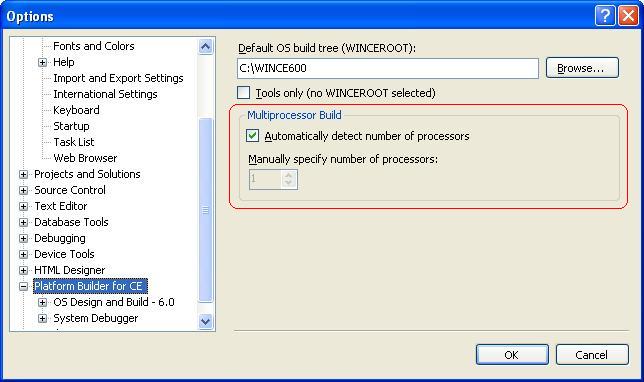
One way to speed up the build is to utilize the multiprocessor build. But if you do, be careful to use synchronization macros (such as SYNCHONIZE_DRAIN) where needed and only where needed as theses macros will completely stall the build process until synchronization is completed.

Enabling multiprocessor build is very simple: form the Platform Builder Tools menu choose Options… The options for Multiprocessor Build can be found directly under Platform Builder for CE:


Have fun!
Read more! Post this to a friend!

Wednesday, 11 May 2011

Windows Embedded CE QFEs for April 2011 have arrived!

Hi all,

The April updates for Windows Embedded CE are available for download:

Windows Embedded CE 6.0 Monthly Update April 2011:

Fixes made in this update:

Component: Internet Explorer
110405_KB2481555 - This update addresses some Internet Explorer issues.

Component: Kernel
110428_KB2529142 - User mode drivers loaded via LoadDriver are not loaded as non-pageable.
110426_KB2520539 - This update addresses a race condition between UnmapViewOfFile and MapViewOfFile for the named-file mapping object.
110404_KB2521622 - This update addresses an issue in kernel VM implementation specific to ARM processor.

Component: LBCTL
110428_KB2533422 - This update addresses and issue with JScript onClick event not working properly.

Component: Script
110428_KB2527087 - VBScript may not handle InputBox and MsgBox correctly.

Component: UDFS/CDFS
110420_KB2531374 - CD may not play if some file names have Unicode characters.


Windows CE 5.0 Monthly Update April 2011:

Component: Internet Explorer
110405_KB2481558 - This update addresses some Internet Explorer issues.

Remember: it’s important to keep your system up to date!

Have fun!
Read more! Post this to a friend!

Wednesday, 13 April 2011

Windows Embedded CE QFEs for March 2011 have arrived!

Hi all,

The March updates for Windows Embedded CE are available for download:

Windows Embedded CE 6.0 Monthly Update March 2011:

Fixes made in this update:

Component: COMM
110325_KB2514361 - GetHostByAddr function may return incorrect WINS server name.

Component: Core GWES
110310_KB2507166 - MS Mincho font is not available without the AC3FontCompression technology.
110310_KB2506662 - This update addresses some font issues with ClearType option enabled.

Component: CoreOS
110310_KB2498860 - A hang may occur upon detaching USB devices.

Component: Drivers
110331_KB2519657 - This update addresses an issue with FAL inserting free sectors twice into its internal "free sector list".

Component: FSD
110318_KB2516401 - Windows Embedded CE 6.0 may not be able to read the CD if it contains invalid volume descriptors for UDFS file system.

Component: FSDMGR
110329_KB2516902 - This update addresses memory leak.

Component: Internet Explorer
110314_KB2492878 - This update addresses an issue in Internet Explorer.
110315_KB2514454 - Internet Explorer may not display a multi-byte character correctly.
110303_KB2475284 - This update addresses an issue with File_Print menu not working correctly.

Component: Kernel
110321_KB2514264 - This update addressess a possible deadlock issue.

Component: MSFlash
110310_KB2504074 - The Transaction Log recovery process in the FlashMDD may not handle bad log blocks correctly. This may result in premature failure of the recovery process.

Component: Pictor
110311_KB2475955 - This update allows OEMs to enable/disable the resolution change.

Component: SOURCE
•110331_KBSOURCE - This release installs updated source files.

Component: TCP/IP
110315_KB2509871 - This update addresses an issue with accessing file share when using ethernet card that uses hardware checksums.

Component: TimeSVC
110302_KB2491392 - SetSystemTime may set the system time incorrectly.

Windows CE 5.0 Monthly Update March 2011:

Component: Internet Explorer
110314_KB2492876 - This update addresses Internet Explorer issue.

Component: Sources
•110331_KBSOURCE - This update releases updated source files.

Remember: it’s important to keep your system up to date!

Have fun!
Read more! Post this to a friend!
Thursday, 27 January 2011

Windows Embedded CE: 2010 Yearly Rollups now available

Hi all,

The yearly cumulative product rollups for Windows Embedded CE have arrived; these updates include all previous updates up until and including December 2010:

Windows Embedded CE 6.0 Cumulative Product Update Rollup Package (through 12/31/2010)

Windows CE 5.0 Cumulative Product Update Rollup Package (through 12/31/2010)

Keep your system up to date!

Have fun!
Read more! Post this to a friend!

Wednesday, 26 January 2011

Image compression considerations under Windows Embedded CE

Hi folks,

You can compress your Windows Embedded CE image (nk.bin) as a whole, only selected components, or only the resources of selected components.

Before we discuss how to compress your Windows Embedded CE image, let’s first have a look at the pros and cons of having a compressed Windows Embedded CE image.

Pro:
Your nk.bin is smaller in size

Contra:
Your Windows Embedded CE image runs slower and needs more RAM at runtime since you loose the “execution in place” advantage: every access to a compressed DLL causes a page fault exception. The respective DLL is then copied and decompressed into RAM.

Compressing only the resources of a component is not quite as critical; in most cases resources need to be relocated and are accessed multiple times anyways, one more access (decompressing) does not really matter. However, the space you save when compressing the resources is minimal.

Now that we established that you shouldn’t use image compression, let’s have a look at how we would accomplish it anyways.

Image compression is configured in .bib files:
  • Global image compression is set in the CONFIG section of the .bib file (normally config.bib):
    COMPRESSION = ON or COMPRESSION = OFF

  • Compression of selected components is set via the C flag in the MODULES or FILES section. This flag is overwritten by the global compression setting.

  • Resource compression of selected components is set via the R flag in the MODULES or FILES section.

Have fun!
Read more! Post this to a friend!